QuickTime, a versatile player, but not for DVDs.
While QuickTime is a great media player for many file types, it doesn't support DVDs. If you try to play a DVD in QuickTime, you'll likely get an error message. Want to watch DVDs on your Mac using QuickTime? You'll need to convert them to a compatible format like MOV. In this post, we share the best free DVD to MOV converter with a step-by-step guide on how to rip DVDs to QuickTime MOV on Mac.
Best Free DVD to QuickTime MOV Ripper for Mac
Free download the free DVD ripper MacX DVD Ripper Free [FREE & safe]. It can easily convert any DVD to MOV:
Rip any protected DVDs to MOV without using any extra decryption library. With a built-in DVD decrypter and title-check mechanism, it can remove region codes, CSS, RCE, APS, UOPs, Sony ARccOS, Disney-X Project, etc. Easily rip 99-title DVDs, oversized 75GB DVDs, workout DVDs, Lionsgate DVDs, damaged/unplayable DVDs, bad sector DVDs, and more. Scan and analyze the right DVD title instantly!
Rip DVDs to QuickTime formats. It will convert DVDs to QuickTime MOV, MP4, M4V, AVI, HEVC, as well as iMovie, Final Cut Pro, iPhone, iPad, Apple TV, Android, TVs, webs, and 350+ profiles.
High Quality. It can convert DVD to MOV QuickTime without losing quality thanks to its advanced High Quality Engine.
5X faster speed. With support for the GPU acceleration technologies from Intel, Nvidia, and AMD, it's able to rip a DVD to QuickTime in 5 minutes.


How to Free Rip DVDs to QuickTime MOV on MacBook/iMac
Step 1. Load the DVD
 Download the free DVD to QuickTime converter for Mac and install it. Insert the DVD into the Mac's disc drive or an external DVD drive. Open the DVD to MOV converter and click "DVD Disc" on the top menu bar. Select the DVD drive to load the DVD information. You can click "Folder" or "ISO" to import DVD content from DVD folder/ISO image on your Mac computer.
Some freeware DVD to QuickTime rippers claim to have good compatibility with protected DVDs, but in reality, they often provide incomplete DVD rips or rips that are out of sync with the audio. Thankfully, MacX DVD Ripper Free can accurately detect the correct title without the need for any additional applications or analysis errors.

Step 2. Choose an output format for QuickTime
After the program loads the correct title of the DVD, it will bring up an output format window. Select an output format for QuickTime: scroll down the list on the left and find Mac General Video > choose "MP4 MPEG-4" or "MOV MPEG-4" from the list on the right.


Step 3. Select Audio/Subtitle Tracks
Back on the home screen, you can click on the selected DVD title to select a subtitle or audio track you would like to play on QuickTime. For example, you can change the default "Disabled Subtitle" to Track1 English, Track2 French or forced subtitle... If your desired subtitle track is not included in the DVD disc, go to Google to download the subtitle track and click the Edit button on the selected title to add external .srt subtitles and apply other editing.

Step 4. Start to Convert DVD to MOV
Click the "Browse" button and choose the location to save the ripped DVD MOV file on your Mac. Then click "RUN" and this free DVD converter software's conversion engine will go into action; the conversion will be finished within minutes. Then you can play the converted MOV DVD video in QuickTime Player.
Note: If any error occurs during the rip, enable "Backup Mode" on the main interface. It's able to convert any DVD with strict protections to QuickTime with no problems.
MacXDVD software calls for copying or ripping DVD under the concept of Fair Use and does not encourage any illegal reproduction or distribution of copyrighted content. Please abide by the local DVD copyright law before doing it.
Rip DVD to MOV with VLC
Another option for ripping DVDs to QuickTime MOV on macOS is using VLC media player. However, if your DVD discs are copy protected, you will need to follow some additional steps to help VLC rip the protected DVDs to QuickTime MOV on Mac.
VLC media player is widely known and used, so there is no need to go through its features again. Instead, let's focus on how to use VLC to decrypt and convert DVDs to MOV QuickTime format on Mac for free. So, let's take a closer look at a detailed user tutorial for using VLC to rip and convert DVDs to MOV on Mac.
How to free rip DVDs to QuickTime MOV on Mac with VLC?
- To determine the correct main title number of a DVD, you can play the source DVD in a DVD player or VLC and take note of the DVD title that is playing. It's important to note that this workaround may not be effective in all cases.
- Open VLC on your Mac. Insert the protected DVD you want to convert into your Mac's DVD drive.
- Click on the "Media" menu and select "Convert/Save".
- In the "Open Media" window, click on the "Disc" tab and select the DVD drive as the source. In the Title section, select the title number that you've just marked down.
- Click on the "Convert/Save" button. In the "Convert" window, select to rip the DVD to QuickTime MOV or MP4.
- Choose the destination folder for the converted file.
- Click on the "Start" button to begin the conversion process.

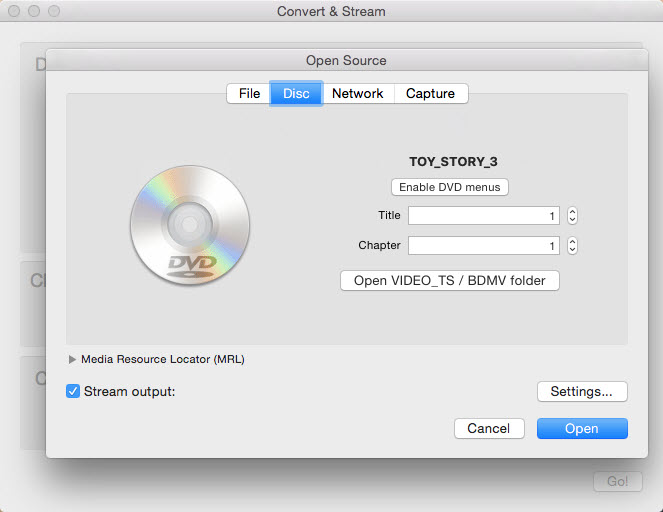
If your VLC failed to recognize the right title from Disney 99-title DVD disc, you can use VLC to play DVD content first and find the right title via VLC. Then, load DVD and manually choose the right title to fix this trouble. Afterwards, your VLC should be able to convert protected DVDs to QuickTime MOV on your Mac without major error.
However, please keep in mind that the legality of ripping copy-protected DVDs varies depending on your country's laws, so be sure to research and comply with any applicable regulations.
Conclusion
Ripping a DVD to QuickTime MOV format is a way to digitize and preserve the contents of a DVD in a more versatile and accessible format. This process allows you to play the DVD QuickTime media player as well as on various devices and platforms that support QuickTime MOV files. VLC is a handy tool to convert a DVD to MOV, but it doesn't support protected DVDs natively. MacX DVD Ripper Free Edition is more professional and much faster to rip an encrypted DVD to QuickTime MOV on Mac.
FAQs about Mac DVD to MOV Ripping
1. Can Handbrake rip DVDs to MOV QuickTime on Mac?
NO, handbrake can't rip DVDs to mov quicktime format on Mac. That's because the current Handbrake doesn't sport with MOV container format profile. It only supports MP4, MKV and WebM container formats. If you consult ChatGPT about this question, it might show you the positive answer alongside with a guide. Don't buy it. It has bugs, as well.
2. How can I convert mov to DVD on mac?
The Mac built-in Finder can help you easily burn MOV to DVD on Mac. Here's how:
- Insert a blank DVD into your Mac's drive.
- Find the QuickTime MOV video you want to burn to DVD and drag it to the finder window. Afterwards, just press the "burn" button located on the upper right-hand corner to burn the MOV video to DVD.
- Enter a name for your blank DVD, and choose a burning speed on the pop-up window. You're suggested to choose a low to medium speed, which ensures good quality. The QuickTime MOV video you burn in this way will turn into a data DVD, you can use it to store your files.


Bella has been working with DVD digitization for over 12 years. She writes articles about everything related to DVD, from disc drive, DVD copyright protection, physical structure, burning and backup tips. The unceasing passion of DVD movies helps her build a rich DVD library and ensure a practical solution to address almost all possible DVD issues. Bella is also a crazy fan for Apple products.